
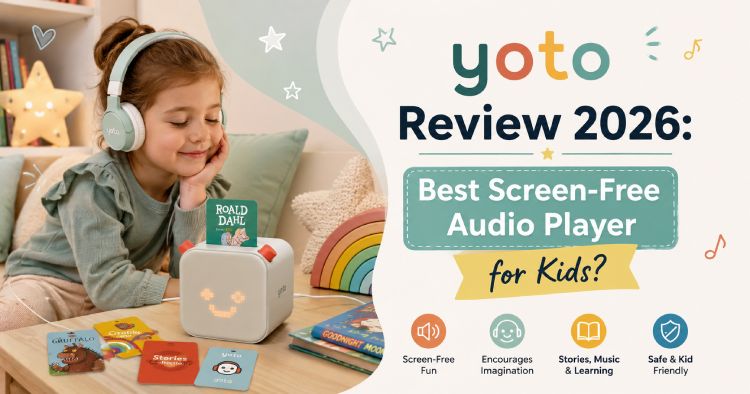
Affiliate Disclosure: This post contains affiliate links. If you make a purchase through these links, we may earn a small commission at no extra cost to you. We only recommend brands and products we genuinely believe in.
If you’ve been trying to cut down on screen time without cutting out entertainment, Yoto has probably come up in your search. This screen-free audio player has become one of the most talked-about tools for parents who want their kids to have independence, imagination, and fun — minus the tablet. Here’s a full breakdown of what Yoto actually offers, how it works, and whether it’s worth the investment for your family.
What Is Yoto?
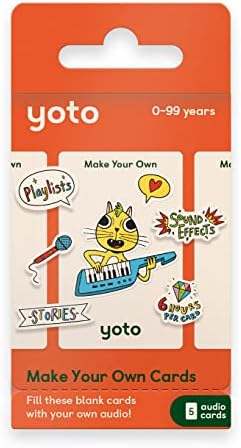
- MAKE YOUR OWN: Get creative with these blank Audiobook Cards! Record voice messages & birthday wishes from family member…
- IN THE BOX: 5 blank audiobook cards with up to 6 hours of recording per card & sticker sheets for you to unleash your cr…
- EASY TO SET UP & USE: Simply pop an audiobook card into the Yoto Player or Mini (sold separately) to play & remove to st…
Yoto is a screen-free audio platform designed specifically for children, built around a simple idea: kids should be able to choose and control their own entertainment without needing a screen or a parent’s phone. Instead of apps and videos, Yoto uses physical cards that slot into a compact speaker, unlocking audiobooks, music, podcasts, sleep sounds, and educational content. There are no cameras, no microphones, and no ads built into the devices, which has made Yoto a favorite among parents prioritizing both safety and independence.
The system is designed for children roughly ages 3 to 12, with big, tactile controls that let even young kids pick a card, adjust the volume, and skip chapters entirely on their own.
How Does Yoto Work?
Using Yoto is intentionally simple:
- Pop in a card — each physical Yoto Card is linked to specific audio content, from stories to music to podcasts
- Kid-friendly buttons — chunky, tactile controls let children play, pause, adjust volume, and change chapters independently
- WiFi for setup and downloads — a WiFi connection is used to set up the player and download card content for offline listening
- Offline playback — once downloaded, most content plays without needing an internet connection, making it ideal for cars, planes, or areas with no WiFi
Yoto Player vs. Yoto Mini: Which One Should You Get?
Yoto currently offers two main devices, and choosing between them comes down to how and where your family plans to use it.
Yoto Player (3rd Generation)

- PLAYER AND JACKET BUNDLE: Comes with a Yoto Player and Yoto Adventure Jacket in Frog Soup.
- PROTECTS YOUR YOTO PLAYER (3RD GEN.): Prevent your Yoto Player from small bumps & damage with this Adventure Jacket whil…
- EASY TO SET UP & USE: Simply pop an Audiobook Card into the Player to play & remove to stop. Use the large dials to adju…
The full-size Yoto Player is designed as a home base for audio entertainment. It includes a programmable night light with multiple color options, an OK-to-wake clock, a sleep timer, and acoustically engineered stereo speakers. It can store over 600 hours of audio for offline listening, and it also works as a standard Bluetooth speaker for parents who want to stream their own music.
Yoto Mini

- YOUR YOTO JOURNEY STARTS HERE: Everything you need to dive into the full Yoto experience – Yoto Player (3rd Gen.), Start…
- EASY TO SET UP & USE: Simply pop an audio card into the Player to play & remove to stop. Use the large dials to adjust t…
- KID-FRIENDLY WITH PARENTAL CONTROL: Enjoy up to 16 hours of screen-free entertainment per charge. All content is safe & …
The Yoto Mini is the compact, travel-friendly version, built for kids to carry on their own adventures. It shares the OK-to-wake clock feature but skips the night light in favor of portability, offering up to 14 hours of battery life and roughly 500 hours of audio storage on newer models. It’s compact enough for backpacks, car rides, and airplane seat pockets, making it a popular pick for travel.
Yoto Content Library: What Can Kids Listen To?
Yoto’s content library spans a wide range of categories designed to grow with a child:
- Audiobooks and stories — including licensed favorites and exclusive Yoto Originals
- Music and radio — ad-free family radio stations and curated playlists
- Podcasts — including Yoto’s own daily podcast, Yoto Daily
- Sleep sounds and white noise — designed to support bedtime routines
- Educational content — phonics, language learning, math, and activity-based audio
- Make Your Own Cards — parents can record their own stories, load personal MP3s, or add podcasts and radio streams onto blank cards using the Yoto app
Yoto Club: Is the Subscription Worth It?
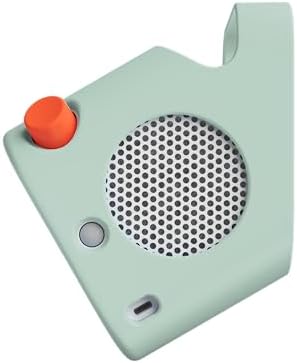
- PROTECTS YOUR YOTO PLAYER (3RD GEN.): Prevent your Yoto Player (sold separately) from small bumps & damage with this Adv…
- EASY TO FIT & CARRY: The silicone sleeve fits snugly over the speaker & features a handle making it easier to carry from…
- AVAILABLE IN 4 DIFFERENT COLOURS: Personalise your device with 1 of 4 eye-catching colours or use different colours to d…
For families who want deeper access to Yoto’s content, Yoto Club is a subscription option offering access to over 200 titles, including Yoto Originals stories, soundscapes, and timers, with new content added regularly. Some plans also include monthly credits that can be applied toward physical Yoto Cards, including licensed collections. It’s optional — the base Yoto Player and Mini come loaded with free content out of the box — but it’s a worthwhile add-on for families who go through content quickly.
Is Yoto Safe for Kids?
Safety is one of Yoto’s core selling points. The devices are built without cameras or microphones, and the platform doesn’t include ads or open internet browsing, meaning kids interact only with the content parents allow through the app. Parents manage settings like maximum volume, day/night clock configuration, and Bluetooth access remotely through the Yoto app, while kids only interact with the physical cards and player buttons — a setup designed to keep control in parents’ hands while giving kids independence within safe limits.
Is Yoto Worth the Price?
Compared to tablets or smartphones loaded with kids’ apps, Yoto sits in a different category entirely — it’s not trying to replace a screen with another screen, it’s removing the screen altogether. For parents specifically looking to reduce screen time while still giving kids an engaging, independent activity, Yoto’s combination of durability, safety features, and a genuinely large content library makes it a strong value, especially with free content included from day one and no ads to worry about later.
How Does Yoto Compare to Other Kids’ Audio Devices?
| Feature | Yoto | Typical Screen-Based Alternative |
|---|---|---|
| Screen | None | Yes |
| Camera/Microphone | None | Often included |
| Ads | None | Common in free apps |
| Offline playback | Yes, up to hundreds of hours | Varies |
| Kid independence | High — physical card control | Lower, often needs adult help |
| Parental controls | Managed remotely via app | Varies |
| Portability | Yoto Mini built for travel | Varies |
Tips for Getting the Most Out of Yoto
- Start with the free content — both devices come loaded with hundreds of free titles, so there’s no need to buy cards immediately
- Use Make Your Own Cards for personal touches — record a bedtime story from a grandparent or load a family playlist
- Choose Mini for travel, Player for home — the Mini’s portability and battery life make it ideal for cars and flights, while the Player’s night light and clock suit bedtime routines
- Check state education programs — Yoto products are eligible for purchase through several state Education Savings Account programs, which can help offset the cost for eligible families
- Download cards before travel — since Yoto Radio and Yoto Daily need WiFi, download the content you’ll want in advance for flights or road trips without a connection
Final Verdict: Should You Buy Yoto?
Yoto has earned its reputation as one of the most trusted screen-free audio solutions for kids by focusing on exactly what parents want: independence for their child, safety for their peace of mind, and genuinely engaging content without ads or screens. Whether you choose the home-based Yoto Player or the travel-ready Yoto Mini, it’s a thoughtfully designed system that grows with your child and fits naturally into daily routines like bedtime, car rides, and quiet time.
Frequently Asked Questions
What age is Yoto designed for? Yoto is designed for children roughly ages 3 to 12, with simple, tactile controls that allow even young kids to operate the player independently.
Does Yoto have a camera or microphone? No, Yoto devices do not include cameras or microphones, which is a key part of the brand’s safety-focused design.
What’s the difference between Yoto Player and Yoto Mini? The Yoto Player is designed as a home device with a night light, wake-up clock, and stereo speakers, while the Yoto Mini is a compact, portable version built for travel with no night light but strong battery life.
Does Yoto need WiFi to work? WiFi is needed to set up the device and download card content, but most listening can be done fully offline once content is downloaded.
Is Yoto Club subscription required? No, Yoto Club is optional. Both the Yoto Player and Yoto Mini come with free content included, and Yoto Club simply unlocks additional titles and features.
Can you make custom Yoto Cards? Yes, using the Make Your Own Cards feature in the Yoto app, parents can record personal stories or load their own audio files, podcasts, or radio streams onto blank cards.